Focused Feature Sprint
- Feature flow map
- Wireframes for priority screens
- High-fidelity UI screens
- Core states and responsive notes
- Developer handoff
UI UX design services for SaaS founders who need clear user flows, polished product screens, Figma systems, prototypes, and developer-ready handoff before engineering begins.
Fixed price · reply in < 1 day

A product can be technically correct and still feel difficult to use. Most interface problems begin before visual design, when the journey is unclear, screens are added without a system, and important states are discovered only after development starts.
A feature list does not explain how someone signs up, reaches the first useful result, completes a core task, recovers from an error, or returns later. User flows connect those moments into a usable product experience.
Early screens are often designed one at a time. Buttons change, forms behave differently, spacing drifts, and similar actions use different labels. A practical design system introduces reusable decisions so the product can expand without creating more design debt.
A clean default screen is only one version of the interface. Real products need loading, empty, error, success, disabled, permission, validation, and responsive states.
When hierarchy, navigation, onboarding, pricing screens, and key user actions are decided during development, the build slows down. Product design creates a decision layer before code is written.
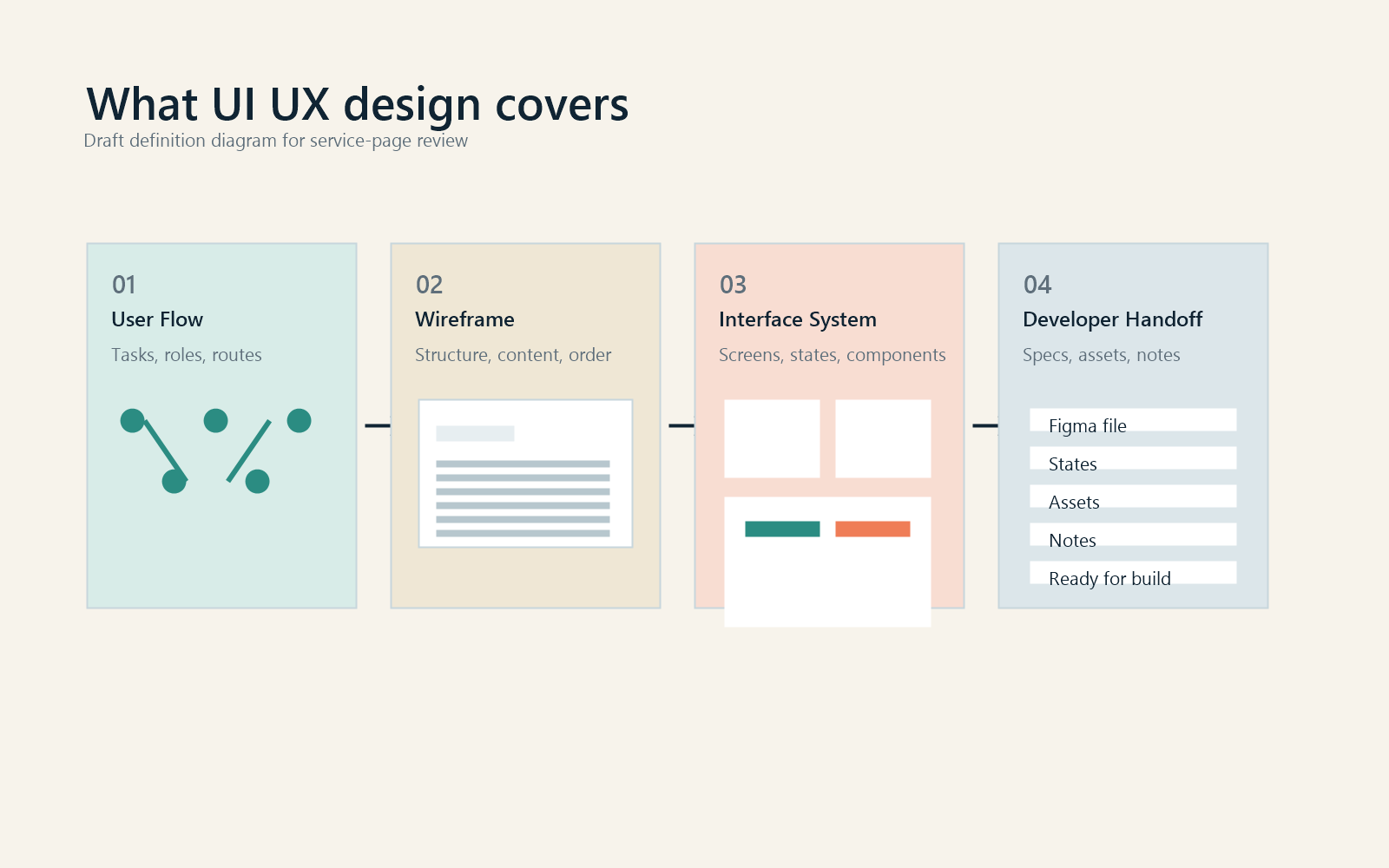
UI UX design services plan how a digital product works and how its interface communicates that behavior. UX design focuses on the complete experience of using the product, including structure, navigation, task flow, feedback, and usability. UI design turns that structure into a clear visual interface with consistent typography, spacing, controls, components, and responsive behavior.
This is different from brand identity design. Brand identity establishes the logo, typography, color, and wider visual language. UI UX design applies the relevant parts of that system to a functional product experience. It is also different from MVP development, which turns the approved product design into working software.

| Planning layer UX design | Interface layer UI design | Build layer MVP development | |
|---|---|---|---|
| Primary goal | Make the product easier to understand and use. | Turn the product structure into a clear visual interface. | Build the approved first version. |
| What ships | User flows, navigation, wireframes, task paths, and state logic. | High-fidelity screens, components, tables, forms, dashboards, and responsive layouts. | Working product, integrations, authentication, deployment, and codebase. |
| How it works | Reduces ambiguity before engineering. | Gives developers a polished source of truth. | Starts after the design scope is clear. |
| Typical timeline | Early in the product sprint. | After the core flow is clear. | After design approval. |
| Afterwards | Feeds the interface system and prototype. | Feeds design system and handoff. | Launch, test, improve. |
The exact deliverables depend on the product stage. A new SaaS platform needs different work from an established dashboard redesign, so the proposal identifies what is included instead of hiding scope behind generic design terms.
A practical map of the first-release product, priority users, screen groups, core flows, and excluded areas so the design sprint has clear boundaries.
Flow maps and navigation decisions that connect screens around real tasks rather than isolated mockups.
Low-fidelity layouts that define hierarchy, task logic, and content priority before visual details take over.
Polished screens for SaaS dashboards, web apps, mobile app flows, forms, data views, onboarding, account settings, and key product states.
Clickable priority flows for stakeholder review, founder alignment, and lightweight validation before development begins.
Reusable buttons, inputs, navigation, cards, tables, modals, tabs, filters, alerts, empty states, and layout rules suited to the first release.
Responsive behavior and important states such as loading, empty, error, success, disabled, validation, permissions, and account roles.
Organized Figma files, component logic, export-ready assets, spacing rules, and implementation notes where the build team needs clarity.
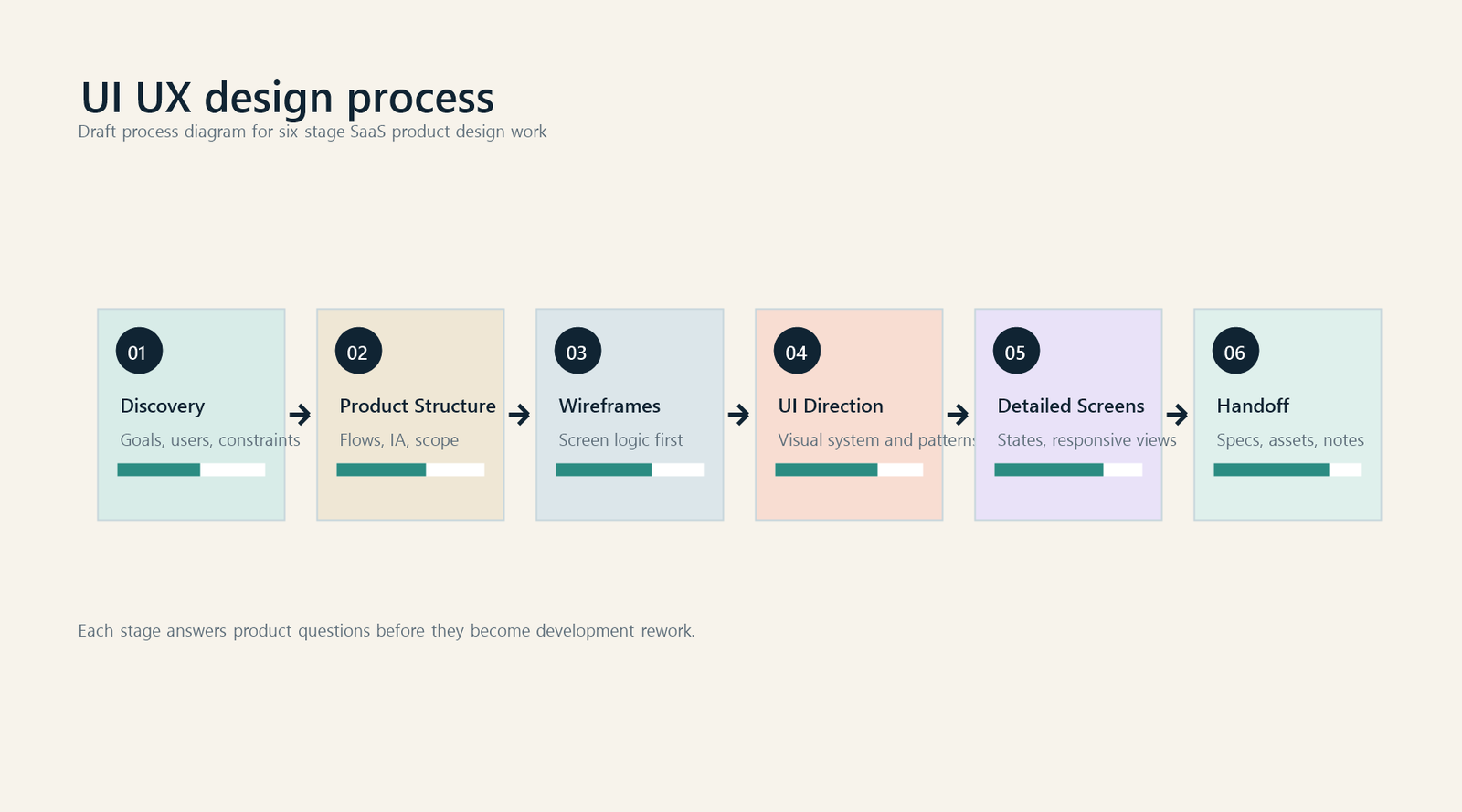
The process keeps product decisions in the right order: structure first, interface second, handoff last. This avoids spending development time on design decisions that should already be settled.


Clarify the product type, audience, current stage, business goal, must-have flows, timeline, existing brand assets, and whether development is already planned.
Break the product into a defined design scope with screen groups, priority flows, excluded areas, review stages, and handoff requirements.
Structure core screens around user actions and business priorities before visual polish. This keeps the review focused on product clarity.
Create representative screens to settle typography, spacing, component style, interaction density, and brand alignment.
Apply the approved direction across agreed screens and states with attention to consistency, usability, responsive behavior, and product-specific details.
Connect key flows where useful, organize the Figma file, clean components, and add handoff notes for development.
The toolset stays practical. The goal is to give founders and developers one clear product design source of truth instead of scattered screenshots, comments, and undocumented decisions.
Your development team should implement approved product decisions, not discover the user flow, missing states, content hierarchy, and interaction rules inside the codebase. A focused UI UX design engagement creates that decision layer before engineering effort becomes expensive to reverse.
UI UX design work is quoted by scope. The proposal defines deliverables, review stages, exclusions, timeline, and price before work begins. Pricing depends on flows, screen complexity, responsive requirements, design system depth, prototype requirements, research inputs, stakeholder review needs, and handoff detail.
These internal checks make the page more useful than a generic service list. They also help buyers understand how the design work reduces user confusion and development rework.
Yash Kaku Designs is a founder-led studio. You work directly with the person responsible for product structure, interface decisions, design quality, and handoff clarity. The advantage is fast context transfer, fewer handoffs, and design judgment that connects brand quality with product usability.


Yash leads brand, product, and interface design work for founder-led companies that need clearer systems, sharper visual execution, and practical design handoff. For UI UX work, the focus is not decorative screens. It is product clarity, usability, and implementation readiness.
The person shaping the interface is also responsible for the product logic, component decisions, and final handoff quality.
The interface is shaped around the product model, user roles, data, brand, and first-release scope instead of generic dashboard patterns.
Screens, states, components, and notes are organized so developers can implement approved decisions instead of interpreting incomplete mockups.
The product should feel credible and premium, but the visual layer must still support scanning, repeated action, and user confidence.
The strongest fit is a digital product where usability, hierarchy, data, and trust matter. The service is intentionally focused on products and product-like experiences rather than general marketing graphics.
Dashboards, tables, analytics views, filters, roles, settings, onboarding, reports, and account management flows.
Operational interfaces that need clarity, speed, readable data, clear permissions, and practical error handling.
Prompt flows, generated results, review states, confidence cues, model settings, onboarding, and feedback loops.
Browse, compare, request, approve, checkout, messaging, account, and role-based screens.
Plan comparison, onboarding, billing, account settings, usage states, and upgrade or cancellation flows.
Defined mobile flows, screen systems, onboarding, interaction states, and Figma handoff for mobile-first products.
Data hierarchy, chart context, empty states, filtering, exports, and decision-focused layouts.
First-use experiences that help users reach value faster without hiding important product choices.
If the brand foundation is weak, it should be fixed before or alongside product design. A clear product interface still needs a credible visual system underneath it.
These answers are written for founders comparing UI UX design, product design, dashboard design, and MVP development before committing to a build.
Book a discovery callUI UX design services plan and design the structure, flow, and interface of a digital product. The work can include user flows, wireframes, high-fidelity screens, prototypes, design systems, responsive states, and developer handoff.
Yes. SaaS dashboard design can include navigation, data hierarchy, tables, filters, charts, empty states, account roles, permission states, settings, onboarding, and responsive behavior.
Yes, when the scope is defined. Mobile app UI design can include key flows, screen systems, onboarding, interaction states, and Figma handoff. Native development is separate unless it is included in a larger build engagement.
No. UI UX design defines the product experience before the build. MVP development turns the approved product design into working software. Many founders need UI UX design first so engineering starts with a clearer brief.
Developers receive organized Figma files, approved screens, reusable components, important states, spacing logic, export-ready assets, and handoff notes where needed. The exact handoff format depends on the build team and scope.
Yes. Existing brand guidelines, typography, colors, and visual assets can be applied to the product interface. If the brand system is not strong enough for product design, that risk is raised before the UI sprint starts.
A defined new-product design sprint commonly takes 4 to 6 weeks. A focused feature can take less time, while products with multiple roles, complex data, or mobile and desktop scopes may take longer.
You receive a fit assessment and, when there is a fit, a proposed scope covering screens, deliverables, timeline, review stages, exclusions, and price.
If you are preparing a SaaS product, web app, dashboard, or mobile app for development, start with a focused UI UX design sprint. The goal is a clear product experience, readable full-screen assets, and a handoff your developers can actually use.